You can chart every US futures contract, load seven years of history, backtest a strategy bar by bar and watch it trade a simulated account fed by live prices. On professional software, on your own machine, for zero dollars.
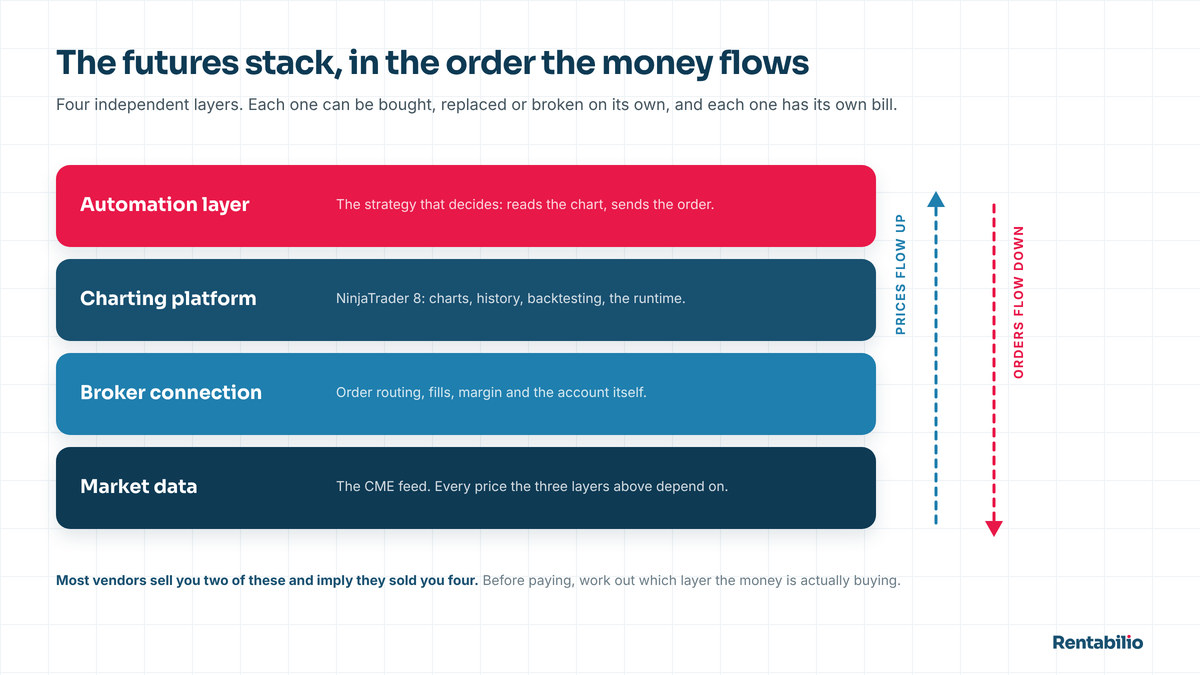
People still manage to spend $200 a month before placing a single trade. Not because they were cheated, but because "trading software" sounds like one purchase and is actually four: market data from one company, the charting platform from another, the broker a third, and an automation layer that might be a fourth or might be a programming language you have to learn.
This guide takes the stack apart layer by layer, then compares the platforms that can genuinely automate a futures strategy, including where the one this site's system runs on is not the right answer.
Buy layers, not brands. Work out which of the four you are actually missing, then pick the cheapest thing that does that layer properly. The common mistake is not buying bad software. It is buying a second copy of a layer you already had.
The four layers you are actually paying for
Every working setup, from a laptop hobbyist to a desk at a fund, is these four pieces in this order. The costs are ballpark, not quotes.
| Layer | What it does | Typical cost | What breaks without it |
|---|---|---|---|
| 1. Market data | Exchange prices, live or historical | Free delayed; a few dollars a month per exchange for real-time non-professional | You are trading yesterday's prices |
| 2. Charting and analysis | Draws, calculates, hosts your logic | $0 to roughly $100 a month | You cannot see or test anything |
| 3. Order routing and broker | Carries orders to the exchange, holds the money | Roughly $1 per micro round turn | Nothing is real |
| 4. Automation and backtesting | Executes rules without you, tests them on history | Often bundled; sometimes a license tier | You are the bottleneck |
The confusion comes from bundling. One product sells layers 1, 2 and 4 together; a prop firm hands you layer 3 with the data folded in. So the question is never "what is the best trading software." The real one is "which layers am I missing, and what is the cheapest honest way to fill them."
Layer one: market data, and the fees nobody mentions
Exchanges own their prices and charge for them. For US index futures that means the CME Group, and the bill reaches you through whichever connection you use. Three things decide what you pay.
- Real-time or delayed. Delayed data, usually ten minutes behind, is free nearly everywhere and useless for trading. Historical data for backtesting is generally free once you have a platform.
- Non-professional or professional. Trading your own money, with no industry registration, makes you non-professional, and those rates are a fraction of professional ones, a few dollars a month per exchange.
- Level 1 or level 2. The one worth understanding properly.
Level 1 versus level 2
Level 1 is the top of the book: last traded price, best bid, best offer and the size at each. It is what a candlestick chart is built from, and if your system reads price and volume it is all you need.
Level 2, market depth, shows resting orders at every price level. It is what a DOM ladder displays and what order flow traders read to see where size is stacking up. It costs more and is harder to use than it looks, since a depth ladder is full of orders never meant to be filled. See order flow versus indicators.
Layer two: the charting and analysis platform
This is the layer people mean when they say "trading software," and where the marketing lives. What it has to do is narrower than the feature lists suggest:
- Correct handling of futures contracts. Contracts expire. The platform must roll them, stitch continuous history for backtesting, and not confuse a thin back month with a real market.
- Tick-level historical data. Backtesting an intraday strategy on daily bars is theater.
- A real programming environment, not a rule builder, which runs out of room the first time your logic needs session state or a conditional exit.
- Stable order handling. Rejections, partial fills, disconnects: a serious platform gives your code a callback for each. A toy assumes everything fills.
- Stability at 8:30 AM ET, when a release hits and volume goes vertical. Everything works at 2 PM on a Tuesday.
A platform does not make a strategy good. It makes a strategy checkable.
Layer three: order routing and the broker
The platform draws the chart. Something else carries the order to the exchange and holds the money. In US futures that splits into a routing technology and a clearing broker, and the names you meet are usually the routing side: Rithmic, CQG, Continuum, Tradovate.
New traders trip here, so state it plainly: your data connection and your broker connection are two plugs, even when one company sells both. On a funded account the firm issues credentials for a specific routing technology, you add that connection profile inside your platform, and the strategy trades that account. You never chose the broker. The firm did.
What to compare here is arithmetic, not software quality. Commissions on micro index futures run around $1 per contract on a round turn, which sounds trivial and is not: across the 4,557 trades in the published Rentabilio backtest they took roughly 5% off the gross result. Add the fills you did not get at the price you wanted and you have the real cost of trading. See slippage and commissions.
Layer four: automation and backtesting
These are one layer because they are the same code. The rules that decide a live trade are the rules walked through history, and if those are two different programs your backtest is fiction. Minimum requirements:
- Tick-by-tick simulation with no forward peeking. A backtester that lets a bar's close influence a decision taken at its open produces a beautiful, meaningless equity curve.
- Commissions and slippage as inputs, not afterthoughts.
- A full report: net profit, trade count, win rate, average winner and loser, profit factor, max drawdown, equity curve. Not one headline number.
- Optimization and walk-forward testing, which is how you find out whether a system was designed or merely fitted to the past.
If a vendor cannot hand you something you can load into a standard tool and run yourself, that is the finding.
The platforms, compared for automation
Now the specific question: which of these can actually run an automated futures strategy, and what is each genuinely best at? None wins every row, including the one this site uses.
| Platform | Language | Backtesting | Live futures automation | Runs on | Genuinely best at |
|---|---|---|---|---|---|
| NinjaTrader 8 | NinjaScript (C#) | Strategy Analyzer: tick level, walk-forward | Native, license tier | Windows only | Free verification before you buy |
| TradingView | Pine Script | Strategy Tester: limited history and fill modeling | Third-party bridges only | Any browser | Charting and screening |
| Sierra Chart | C++ (ACSIL) | Tick level; excellent replay | Native | Windows (Linux via Wine) | Order flow on light resources |
| MultiCharts | PowerLanguage or C# | Portfolio level, many symbols | Native | Windows | Testing a basket as one portfolio |
| Python + broker API | Python | Whatever you build | Yes, if you build it | Anything | Total control, if you can code |
NinjaTrader 8
It dominates US retail futures automation for one structural reason: the analysis half is free and the execution half is paid. Charts, historical data, the development environment, the Strategy Analyzer and a simulated account on live data cost nothing, with no time limit. You pay when you place real orders: a lease, a lifetime license, or no license at all in exchange for higher per-contract rates. Strategies are written in NinjaScript, C# on .NET wrapped in a market-data framework: a real compiled language, not a rule builder.
The honest downsides: it is Windows only, permanently, being bound to the Windows desktop stack. The interface shows its age, it is heavier on memory than Sierra Chart, and the naming is a mess, since NinjaTrader is simultaneously a platform, a brokerage and a data subscription. Full tour in NinjaTrader 8 explained.
TradingView
The best charts in retail trading, and it is not close. Browser-based on any operating system, enormous coverage, excellent drawing tools, fast screening.
For automating futures it is the wrong tool, for specific reasons. Pine Script has deliberate limits on what a script may do, the Strategy Tester models fills approximately, and intraday history is capped by plan. TradingView is also not a futures broker: live automated execution runs through a third-party bridge, adding a moving part between your signal and the exchange at exactly the moment you least want one. Use it to look at markets, not to run a funded account unattended.
Sierra Chart
Genuinely superb at what it does: extremely light on resources, precise charting and data handling, the best market replay in the category, and order flow and DOM tools with a devoted following among people who trade the book directly. The cost is the learning curve: the interface is dense and unapologetically utilitarian, custom studies are written in C++, and configuration rewards patience. It automates futures perfectly well; it is a steeper road for someone who is not already a programmer.
MultiCharts
Its distinguishing feature is portfolio-level backtesting: one strategy across dozens of instruments at once, with shared capital and shared risk. Nothing else at retail prices answers "how does this behave as a portfolio" as directly, and PowerLanguage is close enough to EasyLanguage that TradeStation refugees are productive immediately. It is a paid product with no free analysis tier, which reverses the shopping order: you pay to find out.
Python and a broker API
If you can code, this is the most powerful option and the most work. You own everything (data handling, backtest engine, execution, reconnection logic, logging, monitoring) and nothing is done for you.
Writing the strategy is the easy part. The time goes to everything around it: a dropped connection at 8:31 AM, a partial fill to reconcile, keeping backtest and live code from drifting apart. Inside a mature platform those problems are solved, tested and boring. Rebuilding them is a project, not a weekend. What belongs in code at all is the subject of algorithmic trading.
Does a VPS belong in the stack?
A virtual private server is a rented Windows machine in a data center. You install the platform on it, connect with Remote Desktop, start the strategy and close the window. Your laptop becomes irrelevant.
The argument for one is not speed: shaving milliseconds off a strategy that trades once a day is a fantasy. It is uptime: two power feeds, redundant internet, and no Windows update deciding that 8:29 AM ET is a fine moment to restart. It also solves the Mac problem. A small one runs a few dollars a month.
The argument against is that you may not need it yet. If you trade one morning window, awake at your desk on a stable connection, a VPS buys convenience rather than capability. It becomes close to mandatory once you run several accounts. Both directions in do you need a VPS.
Load the strategy into NinjaTrader 8, set the same dates, press Run, and compare your report against ours. Verification beats trust, including when the party asking to be trusted is us.
Journals and analytics: the layer people skip
There is a fifth layer nobody counts because it never touches the market: a record of what happened and why. For discretionary traders it is the highest-leverage software they will buy. A journal that imports fills and tags them by setup, time of day and size finds patterns in your behavior that memory never will, because memory quietly edits out the trades you regret.
For an automated system the calculation changes. The platform already logs every order and the rules are fixed, so there is nothing to confess, and a spreadsheet usually covers what is left. The question a journal answers for a bot owner is narrow and important: is this system still behaving like its own history? That is the only sound reason to switch one off.
What a working stack actually costs
- Analysis and backtesting: $0, indefinitely, on NinjaTrader 8's free tier.
- Market data: free while backtesting and simulating; a few dollars a month per exchange once live, often bundled with the connection.
- Live execution: a license tier on your own account, or nothing on a funded account.
- Commissions: roughly $1 per micro contract per round turn, the cost that scales with activity.
- VPS: a few dollars a month. Optional at first, close to essential once you scale.
- The strategy: whatever you pay for it, or your time. See pricing.
The cost of verifying everything before committing is zero, which is the most useful fact in this guide. On funded capital the picture shifts: you buy the evaluation from the prop firm yourself and pay the firm directly, roughly $100 for a 50k, and that fee replaces the trading account while the firm supplies layer three. The largest recurring cost there is not software at all. It is evaluation fees, which is why they belong in the calculator rather than a footnote.
How to buy this in the right order
- Install the free platform first, before choosing a system, a broker or a firm.
- Backtest on historical data. No subscription required. This is where you rule things out.
- Run it in simulation on live data for a few weeks, which is where you find out whether you can leave it alone.
- Only then add the paid layers (real-time data, a license or a funded account, a VPS) one at a time.
- Add a journal when you have something to journal. Not before.
In that order, every dollar answers a question you already had. Backward, you buy a stack and then look for something to do with it. What makes a system worth running at all is in best trading systems.
For context on what this stack is asked to do here: the published Rentabilio backtest was produced in NinjaTrader 8's Strategy Analyzer over 88 months, on a $50,000 funded account at one micro contract. $274,406 gross, ≈$260,700 net, 4,557 trades, a 46.2% win rate, profit factor 1.58, maximum drawdown $4,379. It loses more often than it wins. See how it works.
Hypothetical performance. The figures above come from a backtest, a simulation over historical data, with no real money at risk. Simulated results are prepared with hindsight and cannot fully reflect real execution, slippage or liquidity. Past performance, real or simulated, does not guarantee future results.
Frequently asked questions
What is the best trading software for a complete beginner?
TradingView to learn what markets look like, because it is free and runs in a browser on any device. NinjaTrader 8 the moment you want to test a rule set rather than eyeball one, since its analysis and simulation tiers cost nothing. Between them a beginner is fully equipped, and neither costs a cent until a live order is placed.
Can I automate futures trading on a Mac?
Not directly with NinjaTrader 8, which is a Windows .NET application with no native Mac version and no plans for one. The options are Windows in a virtual machine, a separate Windows PC, or a Windows virtual private server for a few dollars a month. Most people trading a single daily window end up on the VPS, because it stays online whether or not their own computer does.
Do I need level 2 market depth data?
Only if your method actually reads the order book. Level 1 gives last price, best bid, best offer and size, which is everything a chart is built from and everything a price-and-volume system needs. Level 2 costs more and takes real skill to interpret. Subscribe when you can explain what you would do differently with it.
Is free trading software worse than paid?
Not in this category. The free tier of NinjaTrader 8 contains the full strategy development environment and the same Strategy Analyzer used to produce commercial backtests, with no time limit and no crippled analysis features. What you pay for is live order routing, not capability. Treat "free" here as a reason to check a vendor's claims before spending.
Should I write my own strategy in Python instead of buying one?
If you can code and have months to spend, yes: you will understand your system in a way no buyer does. What people underestimate is the operational half: reconnection logic, order reconciliation, fill handling, and keeping backtest and live code identical. Inside a mature platform those are solved and boring; rebuilding them is an engineering project stacked on the trading one.
Does better software improve my results?
Barely, past a low threshold. Once a platform prices futures correctly, backtests at tick level and handles orders reliably, further spending buys comfort rather than edge. Results come from the rules being traded, which is why automating a mediocre plan produces a mediocre outcome with excellent consistency. Pick a competent platform and put the attention on the system.